3 Favorite Evernote Extensions and Apps

Posted by Unknown Sabtu, 25 Februari 2012 0 komentar
I have posted on Evernote several times. It is undoubtedly the most versatile application I use. It is the perfect note taking, resource collecting tool available to users. And, I would add that it is one of the few apps that is entirely worth the premium price. (I say that not as a paid advertiser, but as a highly pleased user.)

Here are my favorite Evernote extensions and apps.

Evernote Web Clipper
This extension allows users to save items found on the web with the click of a button. It is available for all major web browsers. Easily clip web items, choose which notebook to place them, and add tags to help with later access. It is a very easy to use web extension. For more information about Evernote Web Clipper check here.

evernotewebclipper
Evernote Web Clipper Extension

Evernote Clearly
Evernote Clearly is one of those extensions that makes reading the web easier. With just one click of the Clearly browser button, users can enjoy reading web pages distraction-free. There are user options available for how the article is viewed. Users can even save distraction-free copies of the articles into their Evernote account notebooks. For more information about Evernote Clearly check here.

evernoteclearly
Evernote Clearly for Distraction-Free Web Reading

Sticky Notes
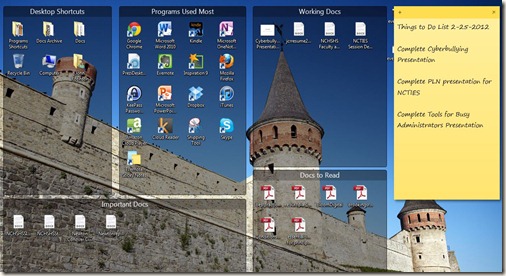
There are sticky note programs everywhere on the web. Some have lots of features that make them quite functional. Evernote’s Stick Notes app allows users to create desktop sticky notes that are linked to their Evernote account. Users can post a reminder on a sticky note on the desktop, and it will automatically be synced to an Evernote notebook. It is just another way that Evernote helps users get things done. For more information about Evernote Sticky Notes, check Evernote Sticky Notes Here.
evernotesticknotes
Evernote Sticky Notes App Links to Evernote Account
Evernote’s versatility only improves as more and extensions and apps are created. It is the most versatile application in my school administrator arsenal.

Baca Selengkapnya ....

Free 'Music Visualizers' (Visualizations) for Samsung Galaxy Ace

Posted by Unknown Minggu, 19 Februari 2012 0 komentar
Don't know how many of us like to see visualizations moving along with our favorite music. But, I really like the stuff responding to the beats of music! It helps me focus on music better. Every thump, every major beat can be SEEN & felt better if a good visualizer is there. Android does have a few for your phones / tabs. A few are paid apps but I only talk about the FREE ones. Here are the 2 apps / visualizers that I myself use.


1. WIRE Visualizer : - Its fast & is very responsive. Has got excellent UI & many options for you to change the pattern & image. Effects are very good & is light on your device memory. Would like it more had it included option to add our own images! 


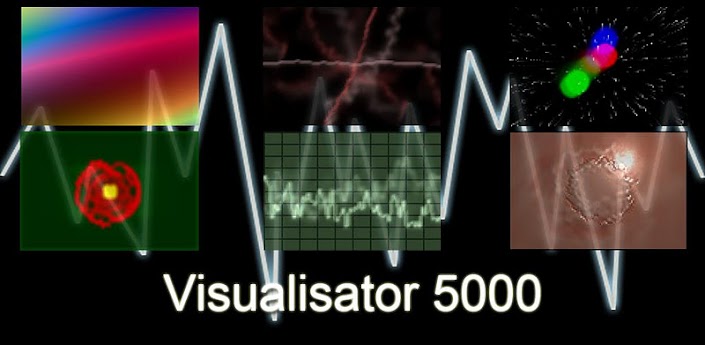
2. Visualisator 5000 : - Its very light, fast & customizable. Free version has 13 visual presets. Paid has 3 more :) It works with any sound that it can detect. So any sound coming off your favorite music player will make the visualizer respond to that. You can customize the texture to get optimum speed of the animation.  

Baca Selengkapnya ....

Download Premium Android Apps Free on GetJar.com

Posted by Unknown Minggu, 05 Februari 2012 0 komentar
Finally we have a platform where the paid apps are available free for download. Don't worry, this is 100% legal, our old Symbian platform named 'GetJar' now offers Android Apps too through their open platform!

GetJar is the world's largest free app store with over 2 billion downloads to date. The company distributes more than 350,000 mobile applications for Android and 395,000 developers have registered with GetJar to distribute their apps. In 2011, GetJar was named as one of the ‘Ones To Watch’ by GigaOM Europe.

Currently there are more than 40 premium apps listed in their website for free download. Recently GetJar listed one of the top selling iPhone game named 'Fragger' from MiniClips. There is another fact which needs to be mentioned here, this app is available only in GetJar, not in Google Android market nor in Amazon Marketplace!


Here are some of the premium apps which are available for free download from GetJar:

Trial Xtreme

Trial Xtreme is a motorcycle racing game with more than 100,000 downloads which costs $1.99 on Google Android Market. With 60 levels of breathtaking motorcycle adventures, it really is a great game.

NodeBeat

This is a visual music fun app to create your own music with your touch pad! Simply drag and drop music nodes and your music is ready. This costs $1.99 but you can download it free from GetJar.

Other Apps:


Missile Defender-$0.99

Piano Man Standard-$1.99

My Zoo- $4.99

Lab of the Dead - $1

Magic Hour Camera - $1.99

Ultimate Checklist - $2.99

TekTrak Mobile Security - $4.99

The Moron Test - $0.99

Grow - $1.99

Rapid Toss - $1.99

Wifi File Explorer Pro - $0.99

What the Doodle - $3.28

Magic Defenders HD - $1.34

365 Board Games - $2.99

Chu Chu Rocket - $0.99

Gravity Guy - $1.05

Farm Frenzy - $3.26

Majesty Fantasy Kingdom - $2.99

Battle Boats 3D - $0.99

Yumsters - $2.31

Babel Rising - $1.99

Rocketron - $0.99

365 Bowling - $3.21

Bike Mania - $0.99

Crash Test Dummies 2 - $2.99

Top Truck - $0.99

Wiki Encyclopedia Pro - $0.99

Walkabout - $1.49

Clowning Around - $0.99

180 Ultra - $2.99

JAWS - $2.99

*Fling - $0.99

Prison Ball - $1

Doodle Farm - $2.90

Cyberlords Arcology - $1.39

Super Dynamite Fishing - $1.39

Beautiful Widgets - $2.99

Super Dynamite Fishing - $1.39

Solo - $3.86

Paper Camera - $1.85

TuneIn Radio Pro - $0.99

Radardroid Pro - $6.77

Krazy Kart Racing - $3.43

Samurai II: Vengeance - $2.99

Deer Hunter African Safari - $4.99

Smart Office plus - $4.99

Backbreaker - $2.99

Pollushot - $0.99

4 Player Reactor - $2.99

BEST TIC TAC TOE FULL - $4.99

Fluffy Birds Deluxe - $2.99

Galataxi - $1.49

Tattoo Tycoon - $1.49

Guerrilla Bob - $2.99

Days Left Widget Pro - $0.99

Townsmen 6 - $1.39

Ninjammin Beat-jitsu - $1

Castle Warriors - $2.99

Car Maintenance Reminder Pro - $1.99

Aporkalypse Pigs of Doom - $1.39

Droplets - $1.99

Super Snake HD - $1

Karoshi - $1

Fake Me Out Of Here - $1.99

Cross Fingers - $1.99

Office Rush - $0.99

Cross Fingers - $1.99

FMX IV – Freestyle Motocross - $6.93


*Frager - Exclusively on GetJar!


Baca Selengkapnya ....

10 Signs You Are a 21st Century E-reader Reader

Posted by Unknown Sabtu, 04 Februari 2012 0 komentar
The news is clear: the conversion to widespread use of e-readers and e-books continues apace. Textbook publishers and publishers of all types better have plans to offer e-book versions of their products or they will find their audiences limited.

Today, I personally discovered a phenomenon about this e-book transition while using a physical book. I actually caught myself trying to change the page in a book using the finger-slide method I use with my e-reader devices. That leads me to offer up this list of signs you are a converted E-reader Reader.

1) You try to turn the pages by sliding your fingers across the paper page or turn pages the way you would with your e-reader.
2) You try to highlight text by sliding your finger across the physical text in a book, and you actually wait for the pop-up selection box to appear that allows you to copy or highlight text.
3) You know you purchased a book, though you can't remember whether it was in e-book or physical form, but you look first in your e-reader device.
4) You do number 3, and you become disappointed to discover that it was a physical book which means you have to read it the old-fashioned way.
5) Someone suggests a book you need to read, and you become greatly disappointed when you go to the web site to order for you Kindle only to discover it isn't available as a e-text.
6) You buy a e-book version of titles you already have physical versions located on your bookshelves.
7) Months pass before you set foot in an actual bookstore.
8) When you do go to a bookstore, the purpose is to look for books to purchase for your e-reader.
9) You won't purchase a book until it is available as an e-book.
10) You fall asleep with your e-reader lying on your chest in the same place that once was occupied by your favorite, latest paperback novel.

The truth is I was like many out there, slow to adopt the e-reader. I had this fixation about the smell of pages, the touch of book paper between my fingers, and weight of a book on my chest when I would fall asleep. It hasn't taken long for me to get over all of that with all of the added functionality of an e-reader device.

Baca Selengkapnya ....

Learning Real-World Civics: White House Contacts One of Our Students

Posted by Unknown Jumat, 27 Januari 2012 0 komentar
One of the best ways to teach students to become engaged as a citizen of our country, is to have them try to communicate with those in political office. One of our students did just that. A few months back, a student at our school wrote a letter to the Obama Administration, and in that letter she invited the President to visit our school. This week, she and my school secretary were surprised when we received a phone call from the White House. But allow me to let that student tell what happened:


When President Obama visited our state, the Catawba County Democratic Party Chair said that she would deliver some letters from those of us that wanted to write them. I jumped at the opportunity to have contact with the President of the United States of America. I got my letter in on time. Basically, I told President Obama that he has my support and my family’s support and that the Young Democrats of Catawba County are here for him. After signing my name to the letter, I had another thought. So, I wrote on the back: “P.S. You should visit my school.”

A few weeks later, I received a manila envelope in the mail with the return address of The White House. Inside this mysterious envelope was a letter from Michael McSwain, the Associate Director for Scheduling Correspondence from the Office of Scheduling and Advance, explaining that President Obama has a very busy schedule and cannot come to my school at this time. It said that he values each and every invitation he receives to see the country first hand, but it was with sincere regret that “the President is unable to visit your school at this time.” Also in the manila envelope was a picture of the President, the First Lady, and their two children. It just so happens to be autographed by none other than Barrack and Michelle Obama. Even if it is the electronic autograph, it is the thought that counts.

I hadn’t given it much thought recently until English class on January 25, 2012. Mrs. - - - -,  our school secretary, came into my class out of breath saying something about there being a phone call for me. It was who was on the line that had everyone in shock. It was the White House. More specifically, the President’s scheduling coordinator. He told me that President Obama read my letter and appreciated it. He also told me that it was with sincere regret that he could not visit in the near future. While I was a little disappointed that he would not be coming, I was overcome with joy that the President of the United States of America READ my letter. Not only did he read it, he APPRECIATED it. It is things like these that make the world seem less large. It is things like these that make people feel less small.


All this talk about teaching our students to be 21st century citizens means getting them to engage and understand our government. While our student did not receive a phone call from the President himself,  it is things like these that make our students believe they are heard and valued by those who lead our country. 

Baca Selengkapnya ....

Kindle Cloud Reader Adds Highlighting and Note Taking

Posted by Unknown Kamis, 26 Januari 2012 0 komentar
Kindle Cloud Reader just got better with 2 added features that make it as functional as a Kindle or as the Kindle iPad or PC App. Back in December, I listed the Kindle Cloud Reader as one of My 11 Favorite Chrome Browser Apps and Extensions. In that post, I indicated that there were 3 things I wished the Kindle Cloud Reader would give me the ability to do: 1) highlight text, 2) enter reading notes, and 3) access my newstand items.

Users of Chrome's Kindle Cloud Reader app can now:

  • Access their Kindle books from their cloud library.
  • Highlight text in those books.
  • Enter notes about the text.
  • Add bookmarks
  • Customize reading experience by adjusting things like the font and margin size and the backlighting of text.

Kindle Cloud Reader's Highlighting and Note Taking Features


Kindle Cloud Reader is a functional Chrome app that every serious Kindle user must have. To download the app, visit the Chrome Web Store.

Baca Selengkapnya ....

Adobe Photoshop Express for Android

Posted by Unknown 0 komentar
Finally Adobe released a free version of Photoshop, even though the features are basic, its a great move from Adobe to give this Android app free of cost to its users!

With Adobe Photoshop Express, you can edit and share photos virtually anywhere. This is a touch based app, you can crop, rotate, adjust color, and add artistic effects with your fingers! Also you can access your photos from your free Photoshop.com account. There are options to share the photos with your friends and family via social networks such as Facebook.


Click here to go install Adobe Photoshop Express on your Android phone.

Also you can visit Android Marketplace to download the app.

Baca Selengkapnya ....
Trik SEO Terbaru support Online Shop Baju Wanita - Original design by Bamz | Copyright of apk x8.